



QR Code

Contact Us

Phone

Email

Address
Shanxia Village, Shanxia Town, Hui'An County, Fujian Province, China



Stone products sell with confidence when they look safe, accessible, and premium. But anyone who has handled slabs, tiles, or stone samples knows the real problem: stone is heavy, fragile at the edges, and expensive to damage. A Stone Display Rack isn’t “just storage”—it’s a practical system for reducing breakage, improving safety, saving floor space, and guiding customers toward a decision.
This guide breaks down the most common pain points (from chipped corners to chaotic showrooms), the rack options that solve them, and the exact questions you should ask before you order. The goal is simple: help you choose a rack that fits your stone, your workflow, and your customers’ expectations.
A well-designed stone display setup can lower damage rates, reduce handling risk, and make your showroom feel organized and high-end. In this article, you’ll learn how different rack styles perform, what features matter most for safety and presentation, and how to evaluate specifications so you don’t pay for the wrong solution.
If your customers hesitate, it’s rarely because they “don’t like stone.” It’s usually because the buying process feels risky or inconvenient. These are the pain points a good rack system is designed to eliminate:
What customers really want is a clean, calm process: easy comparison, safe access, and confidence that what they like is available and protected.
There’s no universal “best” rack—there’s only the right match for your stone formats, traffic level, and how customers browse. The chart below gives a practical overview.
| Rack Type | Best For | Main Advantage | Watch-Out |
|---|---|---|---|
| A-Frame Rack | Slabs, large panels, backroom staging | Stable angled support; efficient storage | Needs correct padding and spacing to prevent edge contact |
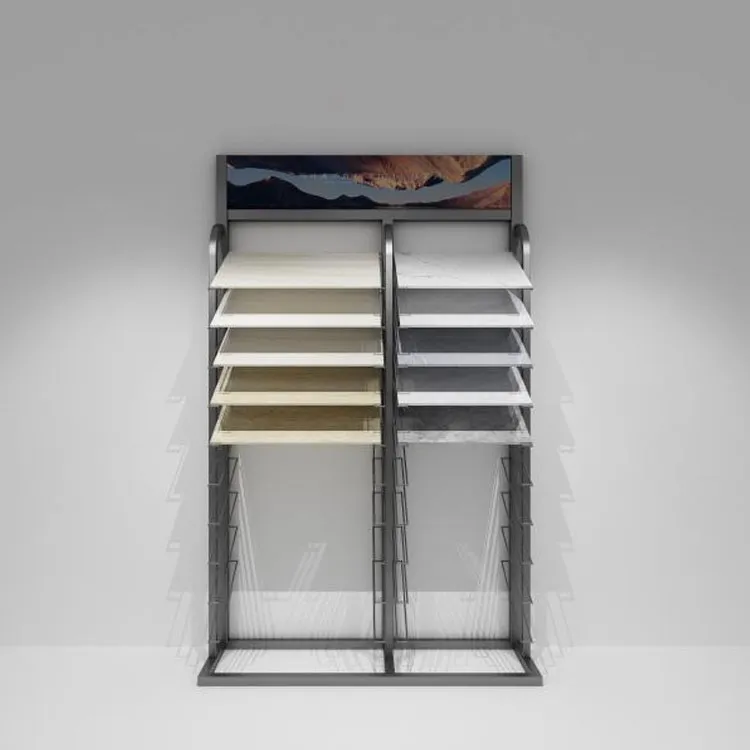
| Vertical Slot Display | Tile boards, sample panels, showroom browsing | Fast comparison; organized categories | Slot width must match thickness range to avoid wobble |
| Tiered Shelf Display | Small tiles, mosaics, boxed samples | Clear visibility; easy labeling | Not ideal for very heavy pieces without reinforcement |
| Rotating or Pivot Panels | Showrooms with many SKUs and limited space | High density display; strong “gallery” feel | Requires smooth mechanics and a stable base |
| Mobile Rack (with locking wheels) | Flexible layouts, events, seasonal resets | Easy to reconfigure; supports guided selling | Wheel quality and locking system are critical for safety |
In practice, many successful showrooms use a hybrid approach: a “front-of-house” display system for browsing and comparison, plus a back-of-house rack system for safe storage and fast retrieval.
Choosing a rack gets easier when you stop thinking “What looks nice?” and start thinking “What problem must it solve?” Use the checklist below to align your purchase with reality.
Space planning tips that prevent expensive mistakes:
When the rack matches the customer’s browsing behavior, your staff stops “guarding the stone” and starts selling it.
Stone display safety is not just a compliance issue—it’s a trust issue. If a customer feels uneasy, they won’t touch products, compare options, or commit to a large purchase. The right rack reduces both physical risk and psychological friction.
Look for these protective features:
Operational habits that amplify rack performance:
A well-built rack does more than hold stone—it makes your whole space feel professionally managed.
A Stone Display Rack can either confuse customers or guide them—your layout determines which one happens. If your display encourages easy comparison, customers spend more time exploring and less time asking “Do you have anything else?”
Practical ways to make browsing easier:
Small details that improve conversion:
When your display is organized, customers don’t just shop—they imagine the finished space. That imagination is the real driver of purchase decisions.
Two racks can look similar online and perform very differently in real life. Before you commit, confirm the specifications that actually affect stability, protection, and usability.
| Specification | Why It Matters | What to Clarify |
|---|---|---|
| Load handling approach | Prevents bending, tipping, or deformation over time | Your heaviest stone type and how it will be loaded/unloaded |
| Slot / spacing design | Protects edges and supports stable browsing | Stone thickness range and whether separators are included |
| Contact surface protection | Reduces scratching and chipping | Padding material type, placement, and replacement method |
| Mobility and locking (if applicable) | Controls movement to prevent accidents | Wheel size, lock strength, and floor surface compatibility |
| Finish and corrosion resistance | Keeps the rack clean-looking and durable | Indoor/outdoor use, humidity exposure, and cleaning routines |
| Packaging and shipping protection | Prevents damage during transit and reduces assembly issues | Protective wrapping, corner protection, and assembly instructions |
Tip: Always share photos or a simple layout sketch of your space with the supplier. The more accurately they understand your workflow, the more likely you’ll receive a rack that feels “made for your showroom,” not “made to ship.”

Even a strong rack performs better when you keep it clean, stable, and predictable for staff and customers.
A display that stays tidy communicates reliability. Customers notice—even if they never say it out loud.
If you’re upgrading your stone presentation, a supplier should do more than “quote a price.” You want a partner who can help you clarify your needs, recommend a structure that matches your stone formats, and support practical details like protection, labeling, and packaging.
Quanzhou Zhongbo Display Props Co., Ltd. focuses on display solutions designed for real retail and showroom use, where durability and presentation have to work together. Whether you need a cleaner browsing layout, a higher-density solution for limited floor space, or a more stable structure for heavier stone products, the right manufacturer can help you translate your inventory and traffic patterns into a rack plan that performs day after day.
When you share what you display, how customers browse, and how often you rotate stock, you’re far more likely to receive a rack setup that improves both safety and sales flow—without overbuilding or overspending.
Q1: How many stone pieces should one rack hold?
A: It depends on thickness, size, and how often pieces are removed for comparison. If customers browse frequently, fewer pieces per section with better spacing usually reduces damage and speeds decisions.
Q2: Is an A-frame rack only for warehouses?
A: Not at all. Many showrooms use A-frames for larger panels or “in-stock” slabs, then use browsing displays for samples. The key is matching the rack’s access style to the customer journey.
Q3: What’s the biggest cause of stone chipping in display areas?
A: Edge-to-edge contact and uncontrolled movement. Good spacing, padding, and a stable base design are often the fastest way to reduce chips.
Q4: How do I know if I need a mobile rack?
A: If you frequently reset your showroom, host events, or need flexible browsing zones, mobility helps. Make sure wheels are robust and locks are strong so the rack feels stable when customers interact with it.
Q5: Should customers be allowed to pull samples themselves?
A: In many showrooms, yes—if the display is designed for safe browsing. Self-access reduces staff bottlenecks and increases time spent comparing, which often increases purchase confidence.
Q6: What should I send a supplier to get the best recommendation?
A: A list of stone sizes/thicknesses, photos of your space, your expected traffic, and whether the display is showroom-facing or storage-focused. The clearer your workflow, the more precise the solution.
If your current display leads to chipped edges, slow browsing, or constant staff intervention, it’s a sign the system is working against you. A better Stone Display Rack setup can protect your inventory, calm your showroom, and help customers compare options with confidence.
Tell us what stone formats you carry, how your customers browse, and how much floor space you want to optimize—and we’ll help you map out a display plan that fits your reality. Ready to upgrade your presentation? Contact us to discuss your requirements and get a tailored recommendation from Quanzhou Zhongbo Display Props Co., Ltd.
Shanxia Village, Shanxia Town, Hui'An County, Fujian Province, China